Tampilkan postingan dengan label PLC. Tampilkan semua postingan
Instruments, Automation And Power Distribution

Instruments, Automation And Power Distribution

Power Distribution Products
Magnetic Contactor, Magnetic Motor Starter, Thermal Overload Relay, Auxiliary Relay, Control Relay, Mini Circuit Breaker(MCB), Vacuum Circuit Breakers, MCCB, Earth Leakage Circuit Breaker (ELCB), High/ Low Voltage Fuse, Circuit Protector, Disconnecting Switch, Ampere/ Volt Selector Switch, Break Resistor, Infra Red Source, Temperature Controller, Automatic Transfer Switch, Command Switch.


Mitsubishi Electric Indonesia

Mitsubishi Electric Indonesia

Nabalseventh, Sole Agent and Authorized Reseller Mitsubishi Electric product in Indonesia, Jual Product Mitsubishi Electric. Untuk informasi pemesanan dan harga silahkan menghubungi sales team kami di:
Tel: 021-8954 3825,
Fax: 021-8837 6742
Mobile: 0821 2592 6275
E-mail: sales@nabalseventh.com


MITSUBISHI ELECTRIC Products:
AC Servo Mitsubishi Electric,
AC Variable Frequency Drives Mitsubishi Electric,
Capacitors Mitsubishi Electric,
Chip Capacitors Mitsubishi Electric,
Circuit Breakers Mitsubishi Electric,
Contactor, Magnetic Mitsubishi Electric,
Diamondback Refrigeration Line Mitsubishi Electric,
DiamondVent Ventilation Mitsubishi Electric,
Digital Security Recorders Mitsubishi Electric,
Gear Motors Mitsubishi Electric,
Heating Mitsubishi Electric,
Inverter Drive A/ C Mitsubishi Electric,
Inverters Mitsubishi Electric,
Limit Switch Mitsubishi Electric,
Line Hide - Lineset Cover Syste Mitsubishi Electric,
Logic Controllers Mitsubishi Electric,
Magnetic Contactor Mitsubishi Electric,
Motion Control Systems Mitsubishi Electric,
Motor Controls Mitsubishi Electric,
PlasmaPure Air Purifiers Mitsubishi Electric,
PLC Mitsubishi Electric Electric Automation,
Power Transistors Mitsubishi Electric,
Programmable Logic Controller Mitsubishi Electric,
Relays ( thermal overload) Mitsubishi Electric,
Rheostat Motors Mitsubishi Electric,
Rotary Sensors Mitsubishi Electric,
Servo Motors ( aka Spindle) Mitsubishi Electric,
Thermisters Mitsubishi Electric,
Transceivers, Transponders Mitsubishi Electric,
Triacs Mitsubishi Electric,
Turbochargers Mitsubishi Electric,
Uninterruptable Power Supplies Mitsubishi Electric,
Variable Speed Controller Mitsubishi Electric, etc…

Mitsubishi Electric Product List:

BU-1500 Mitsubishi Electric ,
BU-15K Mitsubishi Electric ,
BU-3700 Mitsubishi Electric ,
BU-7.5K Mitsubishi Electric ,
BU-H15K Mitsubishi Electric ,
BU-H30K Mitsubishi Electric ,
BU-H7.5K Mitsubishi Electric ,
FR-A024-0.1K Mitsubishi Electric ,
FR-A024-0.2K Mitsubishi Electric ,
FR-A024-0.4K Mitsubishi Electric ,
FR-A024-0.75K Mitsubishi Electric ,
FR-A024-1.5K Mitsubishi Electric ,
FR-A024-2.2K Mitsubishi Electric ,
FR-A024-3.7K Mitsubishi Electric ,
FR-A044-0.4K Mitsubishi Electric ,
FR-A044-0.75K Mitsubishi Electric ,
FR-A044-1.5K Mitsubishi Electric ,
FR-A044-2.2K Mitsubishi Electric ,
FR-A044-3.7K Mitsubishi Electric ,
FR-A520-0.4K Mitsubishi Electric ,
FR-A520-0.75K Mitsubishi Electric ,
FR-A520-1.5K Mitsubishi Electric ,
FR-A520-11K Mitsubishi Electric ,
FR-A520-15K Mitsubishi Electric ,
FR-A520-18.5K Mitsubishi Electric ,
FR-A520-2.2K Mitsubishi Electric ,
FR-A520-22K Mitsubishi Electric ,
FR-A520-3.7K Mitsubishi Electric ,
FR-A520-30K Mitsubishi Electric ,
FR-A520-37K Mitsubishi Electric ,
FR-A520-45K Mitsubishi Electric ,
FR-A520-5.5K Mitsubishi Electric ,
FR-A520-55K Mitsubishi Electric ,
FR-A520-7.5K Mitsubishi Electric ,
FR-A540-0.4K Mitsubishi Electric ,
FR-A540-0.75K Mitsubishi Electric ,
FR-A540-1.5K Mitsubishi Electric ,
FR-A540-11K Mitsubishi Electric ,
FR-A540-15K Mitsubishi Electric ,
FR-A540-18.5K Mitsubishi Electric ,
FR-A540-2.2K Mitsubishi Electric ,
FR-A540-22K Mitsubishi Electric ,
FR-A540-3.7K Mitsubishi Electric ,
FR-A540-30K Mitsubishi Electric ,
FR-A540-37K Mitsubishi Electric ,
FR-A540-45K Mitsubishi Electric ,
FR-A540-5.5K Mitsubishi Electric ,
FR-A540-55K Mitsubishi Electric ,
FR-A540-7.5K Mitsubishi Electric ,
FR-A5AP Mitsubishi Electric ,
FR-A5AR Mitsubishi Electric ,
FR-A5AT01 Mitsubishi Electric ,
FR-A5AT02 Mitsubishi Electric ,
FR-A5AT03 Mitsubishi Electric ,
FR-A5AT04 Mitsubishi Electric ,
FR-A5AT05 Mitsubishi Electric ,
FR-A5AX Mitsubishi Electric ,
FR-A5AY Mitsubishi Electric ,
FR-A5CN01 Mitsubishi Electric ,
FR-A5CN02 Mitsubishi Electric ,
FR-A5CN03 Mitsubishi Electric ,
FR-A5CN04 Mitsubishi Electric ,
FR-A5CN05 Mitsubishi Electric ,
FR-A5CN06 Mitsubishi Electric ,
FR-A5CN07 Mitsubishi Electric ,
FR-A5CN08 Mitsubishi Electric ,
FR-A5CV01 Mitsubishi Electric ,
FR-A5CV02 Mitsubishi Electric ,
FR-A5FN01 Mitsubishi Electric ,
FR-A5FN02 Mitsubishi Electric ,
FR-A5FN03 Mitsubishi Electric ,
FR-A5FN04 Mitsubishi Electric ,
FR-A5FN05 Mitsubishi Electric ,
FR-A5NC Mitsubishi Electric ,
FR-A5ND Mitsubishi Electric ,
FR-A5NL Mitsubishi Electric ,
FR-A5NM Mitsubishi Electric ,
FR-A5NN Mitsubishi Electric ,
FR-A5NP Mitsubishi Electric ,
FR-A5NR Mitsubishi Electric ,
FR-A720-0.4K Mitsubishi Electric ,
FR-A720-0.75K Mitsubishi Electric ,
FR-A720-1.5K Mitsubishi Electric ,
FR-A720-11K Mitsubishi Electric ,
FR-A720-15K Mitsubishi Electric ,
FR-A720-18.5K Mitsubishi Electric ,
FR-A720-2.2K Mitsubishi Electric ,
FR-A720-22K Mitsubishi Electric ,
FR-A720-3.7K Mitsubishi Electric ,
FR-A720-30K Mitsubishi Electric ,
FR-A720-37K Mitsubishi Electric ,
FR-A720-45K Mitsubishi Electric ,
FR-A720-5.5K Mitsubishi Electric ,
FR-A720-55K Mitsubishi Electric ,
FR-A720-7.5K Mitsubishi Electric ,
FR-A740-0.4K Mitsubishi Electric ,
FR-A740-0.75K Mitsubishi Electric ,
FR-A740-1.5K Mitsubishi Electric ,
FR-A740-11K Mitsubishi Electric ,
FR-A740-15K Mitsubishi Electric ,
FR-A740-18.5K Mitsubishi Electric ,
FR-A740-2.2K Mitsubishi Electric ,
FR-A740-22K Mitsubishi Electric ,
FR-A740-3.7K Mitsubishi Electric ,
FR-A740-30K Mitsubishi Electric ,
FR-A740-37K Mitsubishi Electric ,
FR-A740-45K Mitsubishi Electric ,
FR-A740-5.5K Mitsubishi Electric ,
FR-A740-55K Mitsubishi Electric ,
FR-A740-7.5K Mitsubishi Electric ,
FR-A7AP Mitsubishi Electric ,
FR-A7AR Mitsubishi Electric ,
FR-A7AX Mitsubishi Electric ,
FR-A7AY Mitsubishi Electric ,
FR-A7CN01 Mitsubishi Electric ,
FR-A7CN02 Mitsubishi Electric ,
FR-A7CN03 Mitsubishi Electric ,
FR-A7CN04 Mitsubishi Electric ,
FR-A7CN05 Mitsubishi Electric ,
FR-A7CN06 Mitsubishi Electric ,
FR-A7CN07 Mitsubishi Electric ,
FR-A7CN08 Mitsubishi Electric ,
FR-A7CN09 Mitsubishi Electric ,
FR-A7CN10 Mitsubishi Electric ,
FR-A7CN11 Mitsubishi Electric ,
FR-A7NC Mitsubishi Electric ,
FR-A7ND Mitsubishi Electric ,
FR-A7NL Mitsubishi Electric ,
FR-A7NP Mitsubishi Electric ,
FR-AAT01 Mitsubishi Electric ,
FR-AAT02 Mitsubishi Electric ,
FR-AAT03 Mitsubishi Electric ,
FR-AAT04 Mitsubishi Electric ,
FR-AAT05 Mitsubishi Electric ,
FR-AAT06 Mitsubishi Electric ,
FR-AAT07 Mitsubishi Electric ,
FR-AAT08 Mitsubishi Electric ,
FR-AAT09 Mitsubishi Electric ,
FR-AAT10 Mitsubishi Electric ,
FR-AAT11 Mitsubishi Electric ,
FR-AAT21 Mitsubishi Electric ,
FR-AAT22 Mitsubishi Electric ,
FR-AAT23 Mitsubishi Electric ,
FR-AAT24 Mitsubishi Electric ,
FR-AAT27 Mitsubishi Electric ,
FR-ABR-0.4K Mitsubishi Electric ,
FR-ABR-0.75K Mitsubishi Electric ,
FR-ABR-2.2K Mitsubishi Electric ,
FR-ABR-22K Mitsubishi Electric ,
FR-ABR-3.7K Mitsubishi Electric ,
FR-ABR-5.5K Mitsubishi Electric ,
FR-ABR-7.5K Mitsubishi Electric ,
FR-ABR-H0.4K Mitsubishi Electric ,
FR-ABR-H0.75K Mitsubishi Electric ,
FR-ABR-H1.5K Mitsubishi Electric ,
FR-ABR-H2.2K Mitsubishi Electric ,
FR-ABR-H22K Mitsubishi Electric ,
FR-ABR-H3.7K Mitsubishi Electric ,
FR-ABR-H5.5K Mitsubishi Electric ,
FR-ABR-H7.5K Mitsubishi Electric ,
FR-ACN01 Mitsubishi Electric ,
FR-ACN02 Mitsubishi Electric ,
FR-ACN03 Mitsubishi Electric ,
FR-ACN04 Mitsubishi Electric ,
FR-ACN05 Mitsubishi Electric ,
FR-ACN06 Mitsubishi Electric ,
FR-ACN07 Mitsubishi Electric ,
FR-ACN08 Mitsubishi Electric ,
FR-ACV01 Mitsubishi Electric ,
FR-ACV02 Mitsubishi Electric ,
FR-ACV03 Mitsubishi Electric ,
FR-ACV04 Mitsubishi Electric ,
FR-ACV05 Mitsubishi Electric ,
FR-ADP Mitsubishi Electric ,
FR-AFN01 Mitsubishi Electric ,
FR-AFN02 Mitsubishi Electric ,
FR-AFN03 Mitsubishi Electric ,
FR-AFN04 Mitsubishi Electric ,
FR-AFN05 Mitsubishi Electric ,
FR-AFN06 Mitsubishi Electric ,
FR-AFN07 Mitsubishi Electric ,
FR-AFN08 Mitsubishi Electric ,
FR-AFN09 Mitsubishi Electric ,
FR-AFN10 Mitsubishi Electric ,
FR-AL Mitsubishi Electric ,
FR-ALF-0.75K Mitsubishi Electric ,
FR-ALF-2.2K Mitsubishi Electric ,
FR-ALF-3.7K Mitsubishi Electric ,
FR-ALF-H0.75K Mitsubishi Electric ,
FR-ALF-H2.2K Mitsubishi Electric ,
FR-ALF-H3.7K Mitsubishi Electric ,
FR-ARW-1 Mitsubishi Electric ,
FR-ARW03 Mitsubishi Electric ,
FR-ARW03E Mitsubishi Electric ,
FR-ARWE-1 Mitsubishi Electric ,
FR-ARWER-1 Mitsubishi Electric ,
FR-ASF-H1.5K Mitsubishi Electric ,
FR-ASF-H15K Mitsubishi Electric ,
FR-ASF-H22K Mitsubishi Electric ,
FR-ASF-H3.7K Mitsubishi Electric ,
FR-ASF-H37K Mitsubishi Electric ,
FR-ASF-H55K Mitsubishi Electric ,
FR-ASF-H7.5K Mitsubishi Electric ,
FR-AT Mitsubishi Electric ,
FR-AU03 Mitsubishi Electric ,
FR-AX Mitsubishi Electric ,
FR-AYOU Mitsubishi Electric ,
FR-B0L-1500 Mitsubishi Electric ,
FR-BAL-0.4K(N) Mitsubishi Electric ,
FR-BAL-0.75K(N) Mitsubishi Electric ,
FR-BAL-1.5K(N) Mitsubishi Electric ,
FR-BAL-11K(N) Mitsubishi Electric ,
FR-BAL-15K(N) Mitsubishi Electric ,
FR-BAL-2.2K(N) Mitsubishi Electric ,
FR-BAL-22K(N) Mitsubishi Electric ,
FR-BAL-3.7K(N) Mitsubishi Electric ,
FR-BAL-30K(N) Mitsubishi Electric ,
FR-BAL-37K(N) Mitsubishi Electric ,
FR-BAL-45K(N) Mitsubishi Electric ,
FR-BAL-5.5K(N) Mitsubishi Electric ,
FR-BAL-55K(N) Mitsubishi Electric ,
FR-BAL-7.5K(N) Mitsubishi Electric ,
FR-BAL-H0.4K(N) Mitsubishi Electric ,
FR-BAL-H0.75K(N) Mitsubishi Electric ,
FR-BAL-H1.5K(N) Mitsubishi Electric ,
FR-BAL-H11K(N) Mitsubishi Electric ,
FR-BAL-H15K(N) Mitsubishi Electric ,
FR-BAL-H2.2K(N) Mitsubishi Electric ,
FR-BAL-H22K(N) Mitsubishi Electric ,
FR-BAL-H3.7K(N) Mitsubishi Electric ,
FR-BAL-H30K(N) Mitsubishi Electric ,
FR-BAL-H37K(N) Mitsubishi Electric ,
FR-BAL-H45K(N) Mitsubishi Electric ,
FR-BAL-H5.5K(N) Mitsubishi Electric ,
FR-BAL-H55K(N) Mitsubishi Electric ,
FR-BAL-H7.5K(N) Mitsubishi Electric ,
FR-BEL-0.4K Mitsubishi Electric ,
FR-BEL-0.75K Mitsubishi Electric ,
FR-BEL-1.5K Mitsubishi Electric ,
FR-BEL-11K Mitsubishi Electric ,
FR-BEL-15K Mitsubishi Electric ,
FR-BEL-18.5K Mitsubishi Electric ,
FR-BEL-2.2K Mitsubishi Electric ,
FR-BEL-22K Mitsubishi Electric ,
FR-BEL-3.7K Mitsubishi Electric ,
FR-BEL-30K Mitsubishi Electric ,
FR-BEL-37K Mitsubishi Electric ,
FR-BEL-45K Mitsubishi Electric ,
FR-BEL-5.5K Mitsubishi Electric ,
FR-BEL-55K Mitsubishi Electric ,
FR-BEL-7.5K Mitsubishi Electric ,
FR-BEL-H0.4K Mitsubishi Electric ,
FR-BEL-H0.75K Mitsubishi Electric ,
FR-BEL-H1.5K Mitsubishi Electric ,
FR-BEL-H11K(N) Mitsubishi Electric ,
FR-BEL-H15K(N) Mitsubishi Electric ,
FR-BEL-H18.5K Mitsubishi Electric ,
FR-BEL-H2.2K Mitsubishi Electric ,
FR-BEL-H22K Mitsubishi Electric ,
FR-BEL-H3.7K(N) Mitsubishi Electric ,
FR-BEL-H30K Mitsubishi Electric ,
FR-BEL-H37K Mitsubishi Electric ,
FR-BEL-H45K Mitsubishi Electric ,
FR-BEL-H5.5K(N) Mitsubishi Electric ,
FR-BEL-H55K Mitsubishi Electric ,
FR-BEL-H7.5K(N) Mitsubishi Electric ,
FR-BIF Mitsubishi Electric ,
FR-BIF-H Mitsubishi Electric ,
FR-BLF Mitsubishi Electric ,
FR-BOL-11K Mitsubishi Electric ,
FR-BOL-15K Mitsubishi Electric ,
FR-BOL-2200 Mitsubishi Electric ,
FR-BOL-22K Mitsubishi Electric ,
FR-BOL-30K Mitsubishi Electric ,
FR-BOL-3700 Mitsubishi Electric ,
FR-BOL-37K Mitsubishi Electric ,
FR-BOL-400 Mitsubishi Electric ,
FR-BOL-45K Mitsubishi Electric ,
FR-BOL-5.5K Mitsubishi Electric ,
FR-BOL-55K Mitsubishi Electric ,
FR-BOL-7.5K Mitsubishi Electric ,
FR-BOL-750 Mitsubishi Electric ,
FR-BOL-H11K Mitsubishi Electric ,
FR-BOL-H15K Mitsubishi Electric ,
FR-BOL-H22K Mitsubishi Electric ,
FR-BOL-H30K Mitsubishi Electric ,
FR-BOL-H3700 Mitsubishi Electric ,
FR-BOL-H37K Mitsubishi Electric ,
FR-BOL-H45K Mitsubishi Electric ,
FR-BOL-H5.5K Mitsubishi Electric ,
FR-BOL-H55K Mitsubishi Electric ,
FR-BOL-H7.5K Mitsubishi Electric ,
FR-BR-15K Mitsubishi Electric ,
FR-BR-30K Mitsubishi Electric ,
FR-BR-55K Mitsubishi Electric ,
FR-BR-H15K Mitsubishi Electric ,
FR-BR-H30K Mitsubishi Electric ,
FR-BR-H55K Mitsubishi Electric ,
FR-BSF01 Mitsubishi Electric ,
FR-BU-15K Mitsubishi Electric ,
FR-BU-30K Mitsubishi Electric ,
FR-BU-55K Mitsubishi Electric ,
FR-BU-H15K Mitsubishi Electric ,
FR-BU-H30K Mitsubishi Electric ,
FR-BU-H55K Mitsubishi Electric ,
FR-CB201 Mitsubishi Electric ,
FR-CB203 Mitsubishi Electric ,
FR-CB205 Mitsubishi Electric ,
FR-CBL-L1 Mitsubishi Electric ,
FR-CBL-L3 Mitsubishi Electric ,
FR-CBL-L5 Mitsubishi Electric ,
FR-CBL01 Mitsubishi Electric ,
FR-CBL03 Mitsubishi Electric ,
FR-CBL05 Mitsubishi Electric ,
FR-CU01 Mitsubishi Electric ,
FR-CU03 Mitsubishi Electric ,
FR-DU01 Mitsubishi Electric ,
FR-E510W-0.1K Mitsubishi Electric ,
FR-E510W-0.2K Mitsubishi Electric ,
FR-E510W-0.4K Mitsubishi Electric ,
FR-E510W-0.75K Mitsubishi Electric ,
FR-E520-0.1K Mitsubishi Electric ,
FR-E520-0.1KN Mitsubishi Electric ,
FR-E520-0.2K Mitsubishi Electric ,
FR-E520-0.2KN Mitsubishi Electric ,
FR-E520-0.4K Mitsubishi Electric ,
FR-E520-0.4KN Mitsubishi Electric ,
FR-E520-0.75K Mitsubishi Electric ,
FR-E520-0.75KN Mitsubishi Electric ,
FR-E520-1.5K Mitsubishi Electric ,
FR-E520-1.5KN Mitsubishi Electric ,
FR-E520-2.2K Mitsubishi Electric ,
FR-E520-2.2KN Mitsubishi Electric ,
FR-E520-3.7K Mitsubishi Electric ,
FR-E520-3.7KN Mitsubishi Electric ,
FR-E520-5.5K Mitsubishi Electric ,
FR-E520-5.5KN Mitsubishi Electric ,
FR-E520-7.5K Mitsubishi Electric ,
FR-E520-7.5KN Mitsubishi Electric ,
FR-E520S-0.1K Mitsubishi Electric ,
FR-E520S-0.2K Mitsubishi Electric ,
FR-E520S-0.4K Mitsubishi Electric ,
FR-E520S-0.75K Mitsubishi Electric ,
FR-E540-0.4K Mitsubishi Electric ,
FR-E540-0.75K Mitsubishi Electric ,
FR-E540-1.5K Mitsubishi Electric ,
FR-E540-2.2K Mitsubishi Electric ,
FR-E540-3.7K Mitsubishi Electric ,
FR-E540-5.5K Mitsubishi Electric ,
FR-E540-7.5K Mitsubishi Electric ,
FR-E5NF-H0.75K Mitsubishi Electric ,
FR-E5NF-H3.7K Mitsubishi Electric ,
FR-E5NF-H7.5K Mitsubishi Electric ,
FR-E5NL Mitsubishi Electric ,
FR-E5P Mitsubishi Electric ,
FR-E5T Mitsubishi Electric ,
FR-E5T-02 Mitsubishi Electric ,
FR-EPA Mitsubishi Electric ,
FR-EPB Mitsubishi Electric ,
FR-EPC Mitsubishi Electric ,
FR-EPD Mitsubishi Electric ,
FR-EPE Mitsubishi Electric ,
FR-EPG Mitsubishi Electric ,
FR-EPH Mitsubishi Electric ,
FR-F520-0.75K Mitsubishi Electric ,
FR-F520-1.5K Mitsubishi Electric ,
FR-F520-11K Mitsubishi Electric ,
FR-F520-15K Mitsubishi Electric ,
FR-F520-18.5K Mitsubishi Electric ,
FR-F520-2.2K Mitsubishi Electric ,
FR-F520-22K Mitsubishi Electric ,
FR-F520-3.7K Mitsubishi Electric ,
FR-F520-30K Mitsubishi Electric ,
FR-F520-37K Mitsubishi Electric ,
FR-F520-45K Mitsubishi Electric ,
FR-F520-5.5K Mitsubishi Electric ,
FR-F520-55K Mitsubishi Electric ,
FR-F520-7.5K Mitsubishi Electric ,
FR-F520J-0.4K Mitsubishi Electric ,
FR-F520J-0.4KF Mitsubishi Electric ,
FR-F520J-0.75K Mitsubishi Electric ,
FR-F520J-0.75KF Mitsubishi Electric ,
FR-F520J-1.5K Mitsubishi Electric ,
FR-F520J-1.5KF Mitsubishi Electric ,
FR-F520J-11K Mitsubishi Electric ,
FR-F520J-11KF Mitsubishi Electric ,
FR-F520J-15K Mitsubishi Electric ,
FR-F520J-15KF Mitsubishi Electric ,
FR-F520J-2.2K Mitsubishi Electric ,
FR-F520J-2.2KF Mitsubishi Electric ,
FR-F520J-3.7K Mitsubishi Electric ,
FR-F520J-3.7KF Mitsubishi Electric ,
FR-F520J-5.5K Mitsubishi Electric ,
FR-F520J-5.5KF Mitsubishi Electric ,
FR-F520J-7.5K Mitsubishi Electric ,
FR-F520J-7.5KF Mitsubishi Electric ,
FR-F540-0.75K Mitsubishi Electric ,
FR-F540-1.5K Mitsubishi Electric ,
FR-F540-11K Mitsubishi Electric ,
FR-F540-15K Mitsubishi Electric ,
FR-F540-18.5K Mitsubishi Electric ,
FR-F540-2.2K Mitsubishi Electric ,
FR-F540-22K Mitsubishi Electric ,
FR-F540-3.7K Mitsubishi Electric ,
FR-F540-30K Mitsubishi Electric ,
FR-F540-37K Mitsubishi Electric ,
FR-F540-45K Mitsubishi Electric ,
FR-F540-5.5K Mitsubishi Electric ,
FR-F540-55K Mitsubishi Electric ,
FR-F540-7.5K Mitsubishi Electric ,
FR-F540J-0.4K Mitsubishi Electric ,
FR-F540J-0.4KF Mitsubishi Electric ,
FR-F540J-0.75K Mitsubishi Electric ,
FR-F540J-0.75KF Mitsubishi Electric ,
FR-F540J-1.5K Mitsubishi Electric ,
FR-F540J-1.5KF Mitsubishi Electric ,
FR-F540J-11K Mitsubishi Electric ,
FR-F540J-11KF Mitsubishi Electric ,
FR-F540J-15K Mitsubishi Electric ,
FR-F540J-15KF Mitsubishi Electric ,
FR-F540J-2.2K Mitsubishi Electric ,
FR-F540J-2.2KF Mitsubishi Electric ,
FR-F540J-3.7K Mitsubishi Electric ,
FR-F540J-3.7KF Mitsubishi Electric ,
FR-F540J-5.5K Mitsubishi Electric ,
FR-F540J-5.5KF Mitsubishi Electric ,
FR-F540J-7.5K Mitsubishi Electric ,
FR-F540J-7.5KF Mitsubishi Electric ,
FR-F720-0.75K Mitsubishi Electric ,
FR-F720-1.5K Mitsubishi Electric ,
FR-F720-11K Mitsubishi Electric ,
FR-F720-15K Mitsubishi Electric ,
FR-F720-18.5K Mitsubishi Electric ,
FR-F720-2.2K Mitsubishi Electric ,
FR-F720-22K Mitsubishi Electric ,
FR-F720-3.7K Mitsubishi Electric ,
FR-F720-30K Mitsubishi Electric ,
FR-F720-37K Mitsubishi Electric ,
FR-F720-45K Mitsubishi Electric ,
FR-F720-5.5K Mitsubishi Electric ,
FR-F720-55K Mitsubishi Electric ,
FR-F720-7.5K Mitsubishi Electric ,
FR-F740-0.75K Mitsubishi Electric ,
FR-F740-1.5K Mitsubishi Electric ,
FR-F740-11K Mitsubishi Electric ,
FR-F740-15K Mitsubishi Electric ,
FR-F740-18.5K Mitsubishi Electric ,
FR-F740-2.2K Mitsubishi Electric ,
FR-F740-22K Mitsubishi Electric ,
FR-F740-3.7K Mitsubishi Electric ,
FR-F740-30K Mitsubishi Electric ,
FR-F740-37K Mitsubishi Electric ,
FR-F740-45K Mitsubishi Electric ,
FR-F740-5.5K Mitsubishi Electric ,
FR-F740-55K Mitsubishi Electric ,
FR-F740-7.5K Mitsubishi Electric ,
FR-FA Mitsubishi Electric ,
FR-FC Mitsubishi Electric ,
FR-FD Mitsubishi Electric ,
FR-FG Mitsubishi Electric ,
FR-FH Mitsubishi Electric ,
FR-FK Mitsubishi Electric ,
FR-FP Mitsubishi Electric ,
FR-HAL-0.4K Mitsubishi Electric ,
FR-HAL-0.75K Mitsubishi Electric ,
FR-HAL-1.5K Mitsubishi Electric ,
FR-HAL-11K Mitsubishi Electric ,
FR-HAL-15K Mitsubishi Electric ,
FR-HAL-18.5K Mitsubishi Electric ,
FR-HAL-2.2K Mitsubishi Electric ,
FR-HAL-22K Mitsubishi Electric ,
FR-HAL-3.7K Mitsubishi Electric ,
FR-HAL-30K Mitsubishi Electric ,
FR-HAL-37K Mitsubishi Electric ,
FR-HAL-45K Mitsubishi Electric ,
FR-HAL-5.5K Mitsubishi Electric ,
FR-HAL-55K Mitsubishi Electric ,
FR-HAL-7.5K Mitsubishi Electric ,
FR-HAL-H0.4K Mitsubishi Electric ,
FR-HAL-H0.75K Mitsubishi Electric ,
FR-HAL-H1.5K Mitsubishi Electric ,
FR-HAL-H11K Mitsubishi Electric ,
FR-HAL-H15K Mitsubishi Electric ,
FR-HAL-H18.5K Mitsubishi Electric ,
FR-HAL-H2.2K Mitsubishi Electric ,
FR-HAL-H22K Mitsubishi Electric ,
FR-HAL-H3.7K Mitsubishi Electric ,
FR-HAL-H30K Mitsubishi Electric ,
FR-HAL-H37K Mitsubishi Electric ,
FR-HAL-H45K Mitsubishi Electric ,
FR-HAL-H5.5K Mitsubishi Electric ,
FR-HAL-H55K Mitsubishi Electric ,
FR-HAL-H7.5K Mitsubishi Electric ,
FR-HEL-0.4K Mitsubishi Electric ,
FR-HEL-0.75K Mitsubishi Electric ,
FR-HEL-1.5K Mitsubishi Electric ,
FR-HEL-11K Mitsubishi Electric ,
FR-HEL-15K Mitsubishi Electric ,
FR-HEL-18.5K Mitsubishi Electric ,
FR-HEL-2.2K Mitsubishi Electric ,
FR-HEL-22K Mitsubishi Electric ,
FR-HEL-3.7K Mitsubishi Electric ,
FR-HEL-30K Mitsubishi Electric ,
FR-HEL-37K Mitsubishi Electric ,
FR-HEL-45K Mitsubishi Electric ,
FR-HEL-5.5K Mitsubishi Electric ,
FR-HEL-55K Mitsubishi Electric ,
FR-HEL-7.5K Mitsubishi Electric ,
FR-HEL-H0.4K Mitsubishi Electric ,
FR-HEL-H0.75K Mitsubishi Electric ,
FR-HEL-H1.5K Mitsubishi Electric ,
FR-HEL-H11K Mitsubishi Electric ,
FR-HEL-H15K Mitsubishi Electric ,
FR-HEL-H18.5K Mitsubishi Electric ,
FR-HEL-H2.2K Mitsubishi Electric ,
FR-HEL-H22K Mitsubishi Electric ,
FR-HEL-H3.7K Mitsubishi Electric ,
FR-HEL-H30K Mitsubishi Electric ,
FR-HEL-H37K Mitsubishi Electric ,
FR-HEL-H45K Mitsubishi Electric ,
FR-HEL-H5.5K Mitsubishi Electric ,
FR-HEL-H55K Mitsubishi Electric ,
FR-HEL-H7.5K Mitsubishi Electric ,
FR-PU01 Mitsubishi Electric ,
FR-PU01E Mitsubishi Electric ,
FR-PU02-1 Mitsubishi Electric ,
FR-PU02E-1 Mitsubishi Electric ,
FR-PU02ER-1 Mitsubishi Electric ,
FR-PU03 Mitsubishi Electric ,
FR-PU03E Mitsubishi Electric ,
FR-PU04 Mitsubishi Electric ,
FR-PU07 Mitsubishi Electric ,
FR-RC-15K Mitsubishi Electric ,
FR-RC-30K Mitsubishi Electric ,
FR-RC-55K Mitsubishi Electric ,
FR-RC-H15K Mitsubishi Electric ,
FR-RC-H30K Mitsubishi Electric ,
FR-RC-H55K Mitsubishi Electric ,
FR-S510WE-0.1K Mitsubishi Electric ,
FR-S510WE-0.2K Mitsubishi Electric ,
FR-S510WE-0.4K Mitsubishi Electric ,
FR-S510WE-0.75K Mitsubishi Electric ,
FR-S520E-0.1K Mitsubishi Electric ,
FR-S520E-0.2K Mitsubishi Electric ,
FR-S520E-0.4K Mitsubishi Electric ,
FR-S520E-0.75K Mitsubishi Electric ,
FR-S520E-1.5K Mitsubishi Electric ,
FR-S520E-2.2K Mitsubishi Electric ,
FR-S520E-3.7K Mitsubishi Electric ,
FR-S520SE-0.1K Mitsubishi Electric ,
FR-S520SE-0.2K Mitsubishi Electric ,
FR-S520SE-0.4K Mitsubishi Electric ,
FR-S520SE-0.75K Mitsubishi Electric ,
FR-S520SE-1.5K Mitsubishi Electric ,
FR-S540E-0.4K Mitsubishi Electric ,
FR-S540E-0.75K Mitsubishi Electric ,
FR-S540E-1.5K Mitsubishi Electric ,
FR-S540E-2.2K Mitsubishi Electric ,
FR-S540E-3.7K Mitsubishi Electric ,
FR-SW0-COM-WJ Mitsubishi Electric ,
FR-SW0-SEL-WJ Mitsubishi Electric ,
FR-SW2-SETUP-WE Mitsubishi Electric ,
FR-SW2-SETUP-WJ Mitsubishi Electric ,
FR-UDA01 Mitsubishi Electric ,
FR-UDA02 Mitsubishi Electric ,
FR-UDA03 Mitsubishi Electric ,
MRS120W100-0.75K Mitsubishi Electric ,
MRS120W200-0.4K Mitsubishi Electric ,
MRS120W40-3.7K Mitsubishi Electric ,
MRS120W60-1.5K-2.2K Mitsubishi Electric ,
MYS220W100-0.75K Mitsubishi Electric ,
MYS220W150-3.7K 400V Mitsubishi Electric ,
MYS220W200-0.4K Mitsubishi Electric ,
MYS220W250-2.2K 400V Mitsubishi Electric ,
MYS220W40-3.7K Mitsubishi Electric ,
MYS220W50-5.5K Mitsubishi Electric ,
MYS220W60-1.5K-2.2K Mitsubishi Electric ,
QVAH-10 Mitsubishi Electric ,
SF-1170A Mitsubishi Electric ,
SF-1171A Mitsubishi Electric ,
SF-1172A Mitsubishi Electric ,
SF-1173A Mitsubishi Electric ,
SF-1174B Mitsubishi Electric ,
SF-1175 Mitsubishi Electric ,
SF-1176 Mitsubishi Electric ,
SF-1177 Mitsubishi Electric ,
SF-1178 Mitsubishi Electric ,
SF-1179 Mitsubishi Electric ,
SF-1197 Mitsubishi Electric ,
SF-1258 Mitsubishi Electric ,
SF-1259 Mitsubishi Electric ,
SF-1260 Mitsubishi Electric ,
SF-1261 Mitsubishi Electric ,
SF-1262 Mitsubishi Electric ,
SF-1263 Mitsubishi Electric ,
SF-1265 Mitsubishi Electric ,
SF-1306 Mitsubishi Electric ,
SF-1308 Mitsubishi Electric ,
SF-1309 Mitsubishi Electric ,
SF-1320 Mitsubishi Electric ,
SF-1321 Mitsubishi Electric ,
YVGC-500W-NS Mitsubishi Electric ,

PLC CPU Base Unit and Power Supply Series

PLC CPU Base Unit and Power Supply Series

Programmable Logic Controllers (PLCs) are microprocessor-based devices used to control industrial processes or machines. They provide advanced functions, including analog monitoring, control and high speed motion control as well as share data over communication networks.Power Supply Unit series: A1S61PN, A1S62PN, A1S63P
CPU Base Unit series: A1S32B, A1S33B, A1S35B, A1S38B
Input Module series: A1SX10, A1SX20, A1SX30, A1SX40
Input/Output Module series: A1SH42, A1SX48Y
Output Module series: A1SY10, A1SY14, A1SY18
And any Brand: Eaton Cutler-Hammer, rockwell automation, Allen-Bradley, Weidmuller
Installing The CPU Unit and I/O Unit OMRON PLC Step by Step

Installing The CPU Unit and I/O Unit OMRON PLC Step by Step

Installing PLC Step by step using OMRON PLC as sample:

1. Panel Installation
Consider PLC operation, maintenance, and surrounding conditions when installing the PLC in a panel or cabinet. The operating temperature range for the PLC is 0°C to 55°C Be sure that there is adequate ventilation for cooling;
• Allow enough space for air circulation.
• Do not install the PLC above equipment that generates a large amount of heat, such as heaters, transformers, or large resistors.
• Install a cooling fan or system when the ambient temperature exceeds 55°C
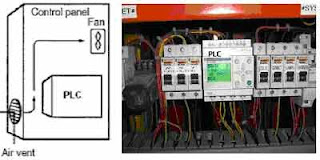
The small PLC in panel


Power lines & high-voltage equipment can cause electrical noise in the PLC; • Do not install the PLC in a panel or cabinet with high-voltage equipment • Allow at least 200 mm between the PLC and nearby power lines See the picture below;
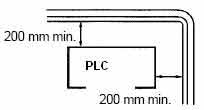
Make sure that the PLC can be accessed for normal operation and maintenance;
• Provide a clear path to the PLC for operation and maintenance. High-voltage equipment or power lines could be dangerous if they are in the way during routine operations
• The PLC will be easiest to access if the panel or cabinet is installed about 3 to 5 feet above the floor

2. Installing the CPU Unit and I/O Unit
The small PLC must be installed in the position shown below to ensure adequate cooling.
See the picture below;


Do not install the small PLC in either of the following positions.

The small PLC can be installed on a horizontal surface or on a DIN track. See the picture below;

Lower the small PLC so that the notch on the back of the PLC catches the top of the DIN Track. Push the PC forward until the lock snaps into place. See the picture below;

For the big PLC before installing, the Units have to compiled one by one. There is no single Unit that can be said to constitute a Rack PLC. To build a Rack PLC, we start with a Backplane. The Backplane for the Omron PLC is shown below.

The Backplane is a simple device having two functions. The first is to provide physical support for the Units to be mounted to it. The second is to provide the connectors and electrical pathways necessary for connecting the Units mounted to it. The core of the PLC is the CPU. The CPU contains the program consisting of the series of steps necessary for the control task. The CPU has a built-in power supply, and fits into the rightmost position of the Backplane.

The CPU of the big PLC has no I/O points built in. So, in order to complete the PLC we need to mount one or more I/O Units to the Backplane. Mount the I/O Unit to the Backplane by locking the top of the I/O Unit into the slot on the Backplane and rotating the I/O Unit downwards as shown in the following diagram. Press down on the yellow tab at the bottom of the slot, press the I/O Unit firmly into position, and then release the yellow tab.

The figure below shows one I/O Unit mounted directly to the left of the CPU.

I/O Units are where the control connections are made from the PLC to all the various input devices and output devices. As you can see from the figure above, there is still some space available on the left side of the Backplane. This space is for any additional I/O Units that may be required.The figure below shows a total of eight I/O Units mounted to the Backplane.

After the big PLC compiled in the backplane then the big PLC can be installed on the DIN Rail. The DIN Rail Mounting Bracket shown below is necessary for mounting the PLC to the DIN Rail.

The following diagram is a view of the back of the Backplane. Attach one Mounting Bracket to the left and right sides of the Backplane as shown below.

Mount the Backplane to the DIN Rail so that the claws on the Mounting Brackets fit into the upper portion of the DIN Rail as shown below.

Loosen the screws attaching the Mounting Brackets to the Backplane. Slide the Backplane upward as shown below so that the Mounting Bracket and Backplane clamp securely onto the DIN Rail. Tighten the screws.


3. Installing the Expansion Unit or Expansion I/O Unit
The Expansion Unit or Expansion I/O Unit are usually attached when amount of I/O devices to be controlled increase its amount over than capacities of the existing I/O Unit or attached when needed to a special need like temperature sensor. The following shown the example of Expansion Units.

Expansion Unit of the small PLC


Expansion Unit of the big PLC

For the small PLC use the following procedure when connecting an Expansion Unit or Expansion I/O Unit;Remove the cover from the CPU Unit’s or the Expansion I/O Unit’s expansion connector. Use a flat-blade screwdriver to remove the cover from the Expansion I/O Connector.


Insert the Expansion I/O Unit’s connecting cable into the CPU Unit’s or the Expansion I/O Unit’s expansion connector.


Replace the cover on the CPU Unit’s or the Expansion I/O Unit’s expansion connector.


For the big PLC use the following picture when connecting an Expansion Unit or Expansion I/O Unit;


4. Installing I/O devices
I/O devices are attached at the place have been determined in the work plan and wiring diagram. For switches are usually attached at the panel while the sensor, selenoid and motor is usually placed at the machine to be controlled.


5. Wiring and connections
Duct Work
Hanging Ducts If power cables carrying more than 10 A 400 V, or 20 A 220 V must be run alongside the I/O wiring (that is, in parallel with it), at least 300 mm must be left between the power cables and the I/O wiring as shown below.


Floor Ducts If the I/O wiring and power cables must be placed in the same duct (for example, where they are connected to the equipment), they must be shielded from each other using grounded metal plates.


Conduits if Separating the PLC I/O lines, power and control lines, and power cables, as shown in the following diagram.


I/O connections
Connect the I/O Devices to the I/O Units. Use 1.25-mm2 cables or larger The terminals have screws with 3.5-mm diameter heads and self-raising pressure plates. Connect the lead wires to the terminals as shown below. Tighten the screws with a torque of 0.8 N _ m.

If you wish to attach solderless type terminals to the ends of the lead wires, use terminals having the dimensions shown below.

The following diagrams show the input configurations. This input configuration depend on specification of the Input Unit will be used. See the specification before install.

The following diagrams show the input configurations. This output configuration depend on specification of the Output Unit will be used. See the specification before install.

Power Supply Wiring on The OMRON PLC

Power Supply Wiring on The OMRON PLC

The following example show the proper way to connect the power source to the PLC. Use 1.25-mm2 cables or larger. The terminal blocks have screws with 3.5-mm diameter heads and self-raising pressure plates. For connecting to the terminal blocks, use round crimp terminals for 3.5-mm diameter heads. Directly connecting stranded wires to the terminal blocks may cause a short-circuit.

Power supply wiring on the Omron PLC

Grounding
This PLC has sufficient protection against noise, so it can be used without grounding except for special much noise. However, when grounding it should be done conforming to below items. Ground the PLC as independently as possible. Class 3 grounding should be used (grounding resistance 100? or less). When independent grounding is impossible, use the joint grounding method as shown in the figure below (B). Use thicker grounding wire. Grounding point should be as near as possible to the PLC to minimize the distance of grounding cable.
See the picture below;

Checking the work and making the report
Inspecting installation
After Installation has been done then done inspection of the work quality and wiring. This matter is executed by checking every extension cables at devices and compared with the wiring diagram which has been prepared. Checking extension cables and devices are done by using the assistive equipment like the multimeter and testpen. Matters which require to be paid attention to in inspection for example:
• Whether all Units of the PLC and I/O devices have been attached truly?
• Whether all cables and connectors have been attached compactly according to the wiring diagram and jam in lickety split?
• Are there Loose terminal screws?
• Are there Loose connectors?


Testing installation
Several items which require to be tested in installation of the PLC for example;
Wiring input
Wiring input can be tested by connecting all input devices and see the indicator lamp on Input Units of the PLC. Wiring input of the PLC can be told goodness if the indicator lamp on Input Units is ON.
Wiring output
Wiring output can be tested by using force instruction to output terminal of the PLC. The instruction can be used without waiting the program has been made and can be separated without damage the existing program if the PLC has been programmed.
The following example show forcing at the Omron PLC;
  • Connect the Programming Console, set the mode switch to PROGRAM mode, and turn ON the PLC
  • Enter the password by press
  • Enter the force instruction by press

see the picture below;

Forcing instruction

Grounding Resistance, Insulation Resistance, Polarity
Grounding resistance, and polarity can be tested by using the Multimeter while insulation resistance can be tested by using the Mega ohmmeter. For the grounding resistance has to less than 100 ohm, for the insulation resistance has to more than 1 Megaohm/volt. The polarity of DC voltage require to be retested to prevent the happening of inversed polarity which can destroy the equipments.

Making the Report
The report is made for documentation. With the good documentation and depository of the good administration peripheral, we will be more easy to look for the archives nor things which we need.

Programmable Logic Controllers Configurations

Programmable Logic Controllers Configurations

Programmable Logic Controllers (PLCs) are microprocessor-based devices used to control industrial processes or machines. They provide advanced functions, including analog monitoring, control and high speed motion control as well as share data over communication networks.

Basic PLCs are available on a single printed circuit board. They are sometimes called single board PLCs or open frame PLCs. These are totally self contained (with the exception of a power supply) and, when installed in a system, they are simply mounted inside a controls cabinet on threaded standoffs. Screw terminals on the printed circuit board allow for the connection of the input, output, and power supply wires. These units are generally not expandable, meaning that extra inputs, outputs, and memory cannot be added to the basic unit. However, some of the more sophisticated models can be linked by cable to expansion boards that can provide extra I/O. Therefore, with few exceptions, when using this type of PLC, the system designer must take care to specify a unit that has enough inputs, outputs, and programming capability to handle both the present need of the system and any future modifications that may be required. Single board PLCs are very inexpensive (some less than $100), easy to program, small, and consume little power, but, generally speaking, they do not have a large number of inputs and outputs, and have a somewhat limited instruction set. They are best suited to small, relatively simple control applications.

Processor
The processor sometimes call a CPU Modules, as in the self contained units, is generally specified according to memory required for the program to be implemented. In the modularized versions, capability can also be a factor. This includes features such as higher math functions, PID control loops and optional programming commands. The processor consists of the microprocessor, system memory, serial communication ports for printer, PLC LAN link and external programming device and, in some cases, the system power supply to power the processor and I/O modules.

Mounting rack
This is usually a metal framework with a printed circuit board backplane which provides means for mounting the PLC input/output (I/O) modules and processor. Mounting racks are specified according to the number of modules required to implement the system. The mounting rack provides data and power connections to the processor and modules via the backplane. For CPUs that do not contain a power supply, the rack also holds the modular power supply. There are systems in which the processor is mounted separately and connected by cable to the rack. The mounting rack can be available to mount directly to a panel or can be installed in a standard 19″ wide equipment cabinet. Mounting racks are cascadable so several may be interconnected to allow a system to accommodate a large number of I/O modules.

Input and Output Modules
Input and output (I/O) modules are specified according to the input and output signals associated with the particular application. These modules fall into the categories of discrete, analog, high speed counter or register types. Discrete I/O modules are generally capable of handling 8 or 16 and, in some cases 32, on-off type inputs or outputs per module. Modules are specified as input or output but generally not both although some manufacturers now offer modules that can be configured with both input and output points in the same unit. The module can be specified as AC only, DC only or AC/DC along with the voltage values for which it is designed.

Analog input and output modules are available and are specified according to the desired resolution and voltage or current range. As with discrete modules, these are generally input or output; however some manufacturers provide analog input and output in the same module. Analog modules are also available which can directly accept thermocouple inputs for temperature measurement and monitoring by the PLC.

Pulsed inputs to the PLC can be accepted using a high speed counter module. This module can be capable of measuring the frequency of an input signal from a tachometer or other frequency generating device. These modules can also count the incoming pulses if desired. Generally, both frequency and count are available from the same module at the same time if both are required in the application. Register input and output modules transfer 8 or 16 bit words of information to and from the PLC. These words are generally numbers (BCD or Binary) which are generated from thumbwheel switches or encoder systems for input or data to be output to a display device by the PLC.

Other types of modules may be available depending upon the manufacturer of the PLC and it’s capabilities. These include specialized communication modules to allow for the transfer of information from one controller to another. One new development is an I/O Module which allows the serial transfer of information to remote I/O units that can be as far as 12,000 feet away.

Power supply
The power supply specified depends upon the manufacturer’s PLC being utilized in the application. As stated above, in some cases a power supply capable of delivering all required power for the system is furnished as part of the processor module. If the power supply is a separate module, it must be capable of delivering a current greater than the sum of all the currents needed by the other modules.

For systems with the power supply inside the CPU module, there may be some modules in the system which require excessive power not available from the processor either because of voltage or current requirements that can only be achieved through the addition of a second power source. This is generally true if analog or external communication modules are present since these require ± DC supplies which, in the case of analog modules, must be well regulated.

Programming Unit
The programming unit allows the engineer or technician to enter and edit the program to be
executed. In it’s simplest form it can be a hand held device with a keypad for program entry and a display device (LED or LCD) for viewing program steps or functions More advanced systems employ a separate personal computer which allows the programmer to write, view, edit and download the program to the PLC.

This is accomplished with proprietary software available from the PLC manufacturer. This software also allows the programmer or engineer to monitor the PLC as it is running the program. With this monitoring system, such things as internal coils, registers, timers and other items not visible externally can be monitored to determine proper operation. Also, internal register data can be altered if required to fine tune program operation. This can be advantageous when debugging the program. Communication with the programmable controller with this system is via a cable connected to a special programming port on the controller. Connection to the personal computer can be through a serial port or from a dedicated card installed in the computer.
PLC OMRON CJ1W-CRM21

PLC OMRON CJ1W-CRM21

Specification:

* CJ-series CompoNet Master Units Increase the Range of Applicability of Sensors and Actuators
* The CJ-series CompoNet Master Unit manages the CompoNet network, controls communications between the PLC and Slave Units, and handles I/ O data and message data.
* Setup is simple. Make the master' s mode settings and set the baud rate, and you' re ready to go.
* Control up to 2, 560 points and 384 nodes with one Master Unit.
* Intuitive memory mapping with separate areas for Word Slave Units and Bit Slave Units.
* Seven-segment display helps with startup and enables prompt detection of problems.
* Collect information from Slave Units using message communications, or use message communications to set parameters.
* Inherits the ease of use of the CompoBus/ S.
* Flexible I/ O allocations with software setting function.etc.
The Main Difference Between PLC and DCS

The Main Difference Between PLC and DCS

Programmable Logic Controllers (PLC)

Programmable Logic Controllers (PLC) were first created to serve the automobile industry, and the first programmable logic controller project was developed in 1968 for General Motors to replace hard-wired relay systems with an electronic controller.

Programmable Logic Controllers, are frequently used to synchronize the flow of inputs from sensors (Physical) and events with the flow of outputs to actuators and events. This leads to precisely controlled actions that permit a tight control of almost any industrial process.

This is actually a control device that consists of a programmable microprocessor, and is programmed using a specialized computer language. Before, a programmable logic controller would have been programmed in ladder logic, which is similar to a schematic of relay logic. A modern programmabl logic controller is usually programmed in any one of several languages, ranging from ladder logic to Basic or C. Typically, the program is written in a development environment on a personal computer (PC), and then is downloaded onto the programmable logic controller directly through a cable connection. The program is stored in the programmable logic controller in non-volatile memory.

Programmable logic controllers contain a variable number of Input/Output (I/O) ports, and are typically Reduced Instruction Set Computer (RISC) based. They are designed for real-time use, and often must withstand harsh environments on the shop floor. The programmable logic controller circuitry monitors the status of multiple sensor inputs, which control output actuators, which may be things like motor starters, solenoids, lights and displays, or valves.

Digital signals yield an on or off signal, which the programmable logic controller sees as Boolean values. Analog signals may also be used, from devices such as volume controls, and these analog signals are seen by the programmable logic controller as floating point values.

There are several different types of interfaces that are used when people need to interact with the programmable logic controller to configure it or work with it. This may take the form of simple lights or switches or text displays, or for more complex systems, a computer of Web interface on a computer running a Supervisory Control and Data Acquisition (SCADA) system.


Distributed Control System (DCS)

Distributed Control System (DCS) is a system of dividing plant or process control into several areas of responsibility, each managed by its own controller, with the whole system connected to form a single entity, usually by means of communication buses.

Distributed Control System (DCS) refers to a control system usually of a manufacturing system, process or any kind of dynamic system, in which the controller elements are not central in location (like the brain) but are distributed throughout the system with each component sub-system controlled by one or more controllers. The entire system of controllers is connected by networks for communication and monitoring.

A DCS typically uses custom designed processors as controllers and uses both proprietary interconnections and Communications protocol for communication. Input & output modules form component parts of the DCS. The processor receives information from input modules and sends information to output modules. The input modules receive information from input instruments in the process (a.k.a. field) and transmit instructions to the output instruments in the field. Computer buses or electrical buses connect the processor and modules through multiplexer or demultiplexers. Buses also connect the distributed controllers with the central controller and finally to the Human-Machine Interface (HMI) or control consoles


What is the difference between PLC and DCS?

The main difference between Programmable Logic Controller (PLC) and Distributed Control System (DCS) are:

The number of I/O in the system. DCS is dealing with very large no. of I/O with less cost. also DCS comes with it's SCADA always. if DCS stopped, all system is stopped. if the system has less No. of I/O, then PLC is better from cost view. Also SCADA is optional. if system is controlled by no of PLC. if PLC is down. others continue working Normally. Historical, main difference was that DCS deal with Analogue signals but PLC deal with Discrete digital system. Now DCS has Digital Modules and PLC has Analogue modules.

Besides, PLC has a processor and input and output cards (I/O card could be digital and/ or analog) Processor has the software - basis the input it receives from field devices it gives out the output commands to control devices of the field. DCS is a group of individual smart controllers (again having embedded software and connections with field devices) doing their specified operation (duty) but interconnected.

Industrial Automation Advantages and disadvantages

Industrial Automation Advantages and disadvantages

What is Industrial Automation?

Automation is the use of control systems (such as numerical control, programmable logic control, and other industrial control systems), in concert with other applications of information technology (such as computer-aided technologies [CAD, CAM, CAx]), to control industrial machinery and processes, reducing the need for human intervention.

In the scope of industrialization, automation is a step beyond mechanization by use of robotic devices to complete manufacturing tasks. Whereas mechanization provided human operators with machinery to assist them with the physical requirements of work, automation greatly reduces the need for human sensory and mental requirements as well. Processes and systems can also be automated.

In this day and age of computers, industrial automation is becoming increasingly important in the manufacturing process because computerized or robotic machines are capable of handling repetitive tasks quickly and efficiently. Machines used in industrial automation are also capable of completing mundane tasks that are not desirable to workers. In addition, the company can save money because it does not need to pay for expensive benefits for this specialized machinery. There are both pros and cons for a company when it comes to industrial automation.

On the plus side, with soaring healthcare costs, paid days off, vacation time, and other costly employee benefits, companies can save money with industrial automation. While robotic machinery can initially be extremely expensive, the loss of monthly wages for production workers leads to incredible savings for the company. While machinery used for industrial automation can break down, it does not happen often. If it does, only a handful of maintenance or computer engineers are needed to handle repairs and get lines running smoothly again.

In addition, many plants hire dozens of production workers for a variety of shifts and need to close on certain days. Industrial automation, however, allows a company to run the plant twenty-four hours a day, 365 days a year, without paying overtime. This fact alone can add up to significant savings.

A company that employs forty-eight factory workers on three different shifts and closes on weekends, for example, can save thousands of dollars with industrial automation. This is particularly true if weekend work is necessary, which means overtime pay of time and a half must be paid for Saturday work and double-time for Sunday. This equates to an additional twelve hours of pay per employee. Of course, life insurance, 401K benefits, dental insurance, health insurance, pension coverage, and disability also contribute to the expense.

Industrial automation can eliminate the need for all forty-eight jobs. The robotic machinery used for industrial automation may only involve a monthly payment until the machinery is paid for, a couple technicians to keep the robotic machinery running, and electricity costs. Unfortunately for workers, industrial automation can eliminate thousands of jobs. As the workforce decreases and the cost of living increases, many families struggle to make ends meet as their jobs are replaced by high-tech machines.

Advantages and disadvantages

The main advantage of automation are:

  • Replacing human operators in tedious tasks.
  • Replacing humans in tasks that should be done in dangerous environments (i.e. Fire, space, volcanoes, nuclear facilities, under the water, etc)
  • Making task that are beyond the human capabilities such as handle too heavy loads, too large objects, too hot or too cold sustances or the requirement to make things too fast or too slow.
  • Economy improvement. Sometimes and some kinds of automation implies improves in economy of enterprises, society or most of humankind. For example, when an enterprise that has invested in automation technology recovers its investment; when a state or country increases its income due to automation like Germany or Japan in the XX Century or when the humankind can use the internet which in turn use satellites and other automated engines.

The main disadvantages of automation are:

  • Technology limits. Nowadays technology is not able to automatizate all the desired tasks.
  • Initial costs are relative high. The automation of a new product required a huge initial investment in comparison with the unit cost of the product, although the cost of automation is spread in many product batches. The automation of a Plant required a great initial investment too, although this cost is spread in the products to be produced.
 
Support : Creating by | PTNGA | Metal
Copyright © 2011. Mitsubishi & Fuji Electric Indonesia - All Rights Reserved
Created by Website Published by Product | Distributed By: Toko
Proudly powered by Blogger